
Cinematic video settings are the camera choices that make footage look like a film rather than a phone clip. The core recipe is simple: 24p or 25p, a shutter near 1/50, controlled ISO, a flat profile and smooth autofocus.
Settings alone do not finish the job. Light, movement and lens choice shape the final image just as much. Our guide on what makes a photo look cinematic covers composition and lens choice in more detail. This guide covers each setting in order, then gives ready setups for the Sony a7 III and Sony a6400. You will also see which Sigma lenses suit each body and why.
Cinematic Camera Settings at a Glance
Start with these cinematic camera settings, then adjust once you see how your scene reacts.
| Setting | Starting value | Why it matters |
| Frame rate | 24p or 25p | Natural, film-like motion |
| Shutter speed | 1/50 | Soft, realistic motion blur |
| Aperture | f/1.4 to f/4 | Controls background blur |
| ISO | Base ISO, or 800 for S-Log | Keeps noise low |
| White balance | Manual Kelvin | Stops colour shifts mid-clip |
| Picture profile | HLG or S-Log | Protects highlight detail |
| Focus | AF-C, slow transition | Prevents sudden focus jumps |
| Resolution | 4K | Leaves room to crop |
Treat these camera settings for cinematic video as a base layer. Each section below explains when to bend the rule.
Best Cinematic Frame Rate and Resolution
The best cinematic frame rate is 24p, and 25p is a near-identical choice for Pakistan. Record in 4K whenever your card and battery allow it.
4K gives sharper detail and space to crop or stabilise in editing. Even for a 1080p Instagram or YouTube upload, downscaled 4K looks cleaner. Keep 1080p for slow motion or very long recordings.
24p vs 25p vs 30p
24p gives the classic film feel, while 25p looks almost the same and suits Pakistan’s 50Hz power. 30p appears smoother and closer to TV or vlog footage.
The standard for films and music videos.
Matches the PAL system and local mains power. It reduces flicker under indoor lights.
Fine for vlogs and tutorials. Motion looks slightly crisper.
On Sony bodies, switching the NTSC/PAL selector to PAL enables 25p and 50p. Pick one system for the whole project. Mixing 24p and 25p clips on one timeline causes visible stutter.
Slow Motion Video Settings: When to Use 50p, 60p or 120fps
Use 50p or 60p for gentle slow motion and 120fps for dramatic slow motion. Only shoot high frame rates when you plan to slow the clip in editing.
Good slow motion video settings follow one habit. Your shutter stays at roughly double the frame rate.
| Frame rate | Shutter speed | Slow-down on a 24p/25p timeline |
| 50p | 1/100 | 2x slower |
| 60p | 1/125 | About 2.5x slower |
| 100p | 1/200 | 4x slower |
| 120fps | 1/250 | 5x slower |
The a7 III and a6400 both record 120fps in Full HD through S&Q mode. Faster frame rates need more light, so plan slow motion for daylight. Mehndi dances, cricket bowling actions and dupatta movement all look lovely at 50p or 60p.
Shutter Speed and the 180 Degree Shutter Rule
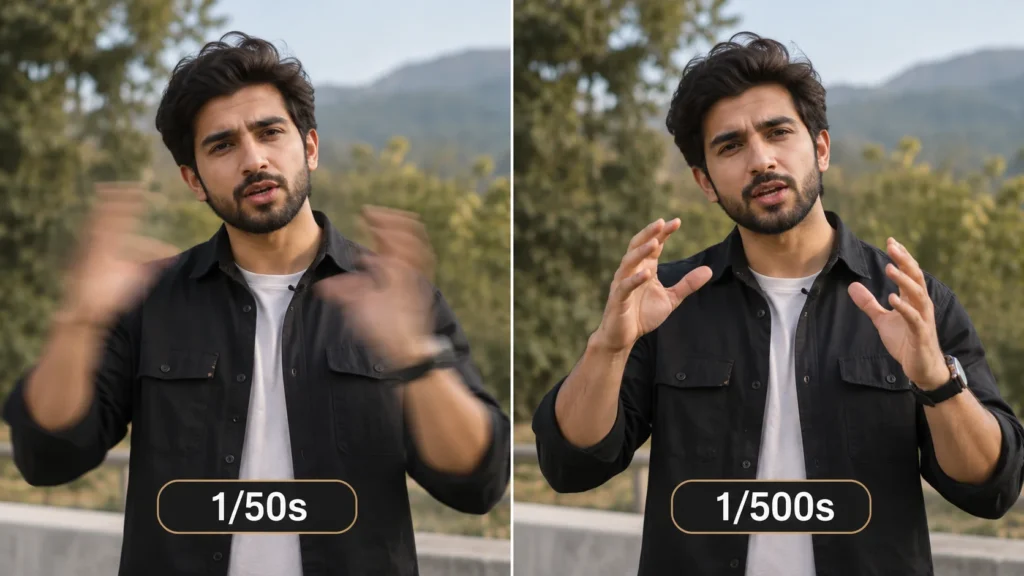
The 180 degree shutter rule means your shutter speed should be double your frame rate. At 24p or 25p, that gives 1/50 of a second.
This setting adds a small amount of motion blur to each frame. Our eyes read that blur as smooth and natural. A fast shutter like 1/500 freezes every frame, so walking and hand gestures look choppy.
- 24p or 25p: 1/50
- 30p: 1/60
- 50p: 1/100
- 60p: 1/125
Use it as a guide, not a law. Some action scenes use a faster shutter on purpose for a gritty, staccato look.
Why ND Filters Matter Outdoors
An ND filter cuts incoming light so you can keep 1/50 and a wide aperture in bright sun. Without one, you must close the aperture or raise the shutter speed.
Midday sun on the Margalla Hills trails is harsh. At f/1.8 and 1/50, your footage will blow out instantly. Proper ND filter video technique solves this without changing your look.
- A variable ND covering 2 to 5 stops (ND4 to ND32) suits most run-and-gun shoots.
- A fixed ND gives cleaner colour and avoids the cross pattern at maximum strength.
- Buy one filter for your largest thread size and use step-up rings for smaller lenses.
How to Reduce Flicker Under LED Lights
Match your shutter to the local mains frequency to stop LED flicker video problems. In Pakistan, that means 1/50 or 1/100 on the 50Hz supply.
Cheap LED bulbs, shop signs and banquet hall lights pulse with the power line. A shutter of 1/60 or 1/125 under these lights often creates rolling dark bands. Indoor wedding venues are the usual trouble spot.
- Shoot 25p or 50p rather than 30p or 60p under mains lighting.
- Keep the shutter at 1/50 or 1/100.
- Check the screen at full magnification before recording.
- Switch to flicker-free video lights if banding remains.
Aperture, ISO and White Balance: Camera Settings for Video
Aperture controls depth of field, ISO sets brightness and white balance keeps colour accurate. Lock these camera settings for video in manual instead of leaving them on auto.
- Aperture: f/1.4 to f/2.8 blurs the background for interviews and portraits. Close down to f/4 or f/5.6 for groups and moving subjects.
- ISO: Stay near ISO 100 with standard profiles. S-Log needs ISO 800 or higher on both Sony bodies.
- White balance: Dial in a fixed Kelvin value. Try 5600K in daylight and 3200K under warm tungsten lamps.
Control brightness with ND filters and lighting before you touch ISO. Auto white balance can shift tones mid-clip when someone walks past a window. Wide-open shots look beautiful, though they leave very little room for focus errors.
Picture Profile for Video: S-Log2, S-Log3, HLG or Standard
The right picture profile for video depends on how much time you spend editing. Standard suits quick delivery, HLG gives easy dynamic range and S-Log3 suits full colour grading.
| Profile | Best for | Editing needed |
| Standard | Quick social clips | None |
| HLG | Weddings and events | Light |
| S-Log2 | 8-bit grading practice | Moderate |
| S-Log3 | Short films and ads | Full grade |
Both cameras record 8-bit 4:2:0 internally. That limits how far you can push log footage. Careful exposure matters, because noisy shadows break apart in the grade.
HLG is underrated for event shooters. It keeps bright windows and white bridal outfits under control. A quick contrast and saturation tweak often completes the look.
S-Log2 vs S-Log3 for Beginners
In the s log2 vs s log3 debate on 8-bit Sony cameras, S-Log2 is usually easier for beginners. It packs tones more tightly, so 8-bit files hold together slightly better.
S-Log3 spreads tones more evenly, especially in the shadows. It needs exposure about 1 to 2 stops brighter than the meter suggests. Underexposed S-Log3 turns muddy and noisy very quickly.
- Begin with HLG to learn basic grading.
- Move to S-Log2 or S-Log3 once LUTs feel comfortable.
- Turn on zebras to protect highlights on faces and skies.
For hands-on guidance, Sigma Academy runs learning classes led by Sigma Ambassadors.
Cinematic Autofocus Settings for Smooth Footage
Smooth cinematic autofocus settings combine AF-C with a slow transition speed and low subject shift sensitivity. Focus then glides between subjects instead of snapping.
Try this starting point on both Sony bodies:
Starting setup for smoother video autofocus
- Focus mode
- AF-C (Continuous AF)
- Focus area
- Wide or Zone
- AF drive speed (movie)
- Slow
- AF tracking sensitivity (movie)
- Standard
- Face Priority in AF
- On, when filming people
The a6400 adds Real-time Tracking and Eye AF during video. The a7 III relies on face detection in movie mode. For a locked-off interview, manual focus with peaking remains the safest option. If focus keeps hunting, these autofocus troubleshooting fixes help.
Sony a7 III Video Settings for Cinematic Footage
The best Sony a7iii video settings are 4K 24p or 25p, 1/50 shutter, S-Log2 or HLG and slow AF-C. At 24p, the a7 III reads the full sensor width with no crop.
| Setting | Value | Note |
| Format | XAVC S 4K, 100Mbps | Best internal quality |
| Frame rate | 24p or 25p | 30p adds about a 1.2x crop |
| Shutter | 1/50 | Double the frame rate |
| ISO | 100, or 800+ for S-Log | Clean up to around 6400 |
| Profile | PP7 (S-Log2) or HLG | Grade-friendly options |
| Stabilization | SteadyShot On | 5-axis IBIS helps handheld |
| Focus | AF-C, Face Priority | No Eye AF in video |
Full-frame glass shows its real character on this body. These Sigma lenses cover most cinematic needs, and our Sigma lens guide for the Sony a7 III goes deeper.
The main all-in-one lens. It covers wide establishing shots and tight close-ups at a constant f/2.8, which suits full wedding days and corporate shoots.
The smart value choice. It is lighter and smaller, so gimbals balance easily during long event days.
Read the full 24-70mm vs 28-70mm comparison before choosing.
A storytelling prime for documentary and walk-and-talk scenes. It frames Walled City lanes with a natural, human perspective.
Cinematic portrait lenses. The 50mm feels honest and close, while the 85mm compresses backgrounds and isolates faces beautifully.
Sony a6400 Video Settings for Cinematic Footage
The best Sony a6400 video settings are 4K 24p or 25p, 1/50 shutter, HLG or S-Log2 and Real-time Tracking. The a6400 has no in-body stabilisation, so plan for a gimbal or steady rig.
| Setting | Value | Note |
| Format | XAVC S 4K, 100Mbps | Best internal quality |
| Frame rate | 24p or 25p | 30p adds about a 1.2x crop |
| Shutter | 1/50 | Double the frame rate |
| ISO | 100, or 500+ for S-Log | Noise rises past 3200 |
| Profile | HLG or S-Log2 | Easier on 8-bit files |
| Focus | AF-C, Real-time Tracking | Eye AF works in video |
| Power setting | Auto Power OFF Temp: High | Longer 4K recording |
Our guide to camera overheating while recording covers more heat fixes for Pakistani summers.
The APS-C sensor adds a 1.5x crop to every lens. Sigma’s DC DN lenses are built for this sensor size and stay compact on the small body.
About 15-27mm equivalent. Ideal for vlogging, real estate walkthroughs and tight interiors.
About 24mm equivalent. A strong low-light pick for night street scenes and talking-head vlogs.
About 27-75mm equivalent. A pocket-sized everyday zoom that matches the a6400’s size perfectly.
Roughly 35mm and 45mm equivalent. Great for food, product and natural storytelling shots.
Roughly 25-60mm equivalent with f/1.8 across the range. It replaces several fast primes but needs a cage or gimbal for balance.
How Lens Choice Changes the Cinematic Look
The best lens for cinematic video is usually a fast prime or a constant f/2.8 zoom. Focal length sets perspective, and aperture decides how much the background melts away.
| Focal length (full-frame) | Visual effect | Typical use |
| 14-24mm | Space and movement | Establishing shots |
| 35-50mm | Close to human vision | Storytelling, documentary |
| 85mm and longer | Background compression | Portraits, interviews |
A few practical details matter on set:
- Constant aperture zooms keep exposure steady while you zoom.
- Fast primes at f/1.4 give freedom at night events and dim mehndi venues.
- Some lenses shift framing slightly during focus pulls, so test before a key shot.
- Several Sigma Art lenses offer an aperture ring with a de-click switch for silent changes.
Your lens also affects other settings. An f/1.4 prime at 1/50 in daylight needs a much stronger ND than an f/2.8 zoom.
Common Cinematic Video Setting Mistakes
Most cinematic video mistakes come from auto settings, the wrong shutter speed and poor exposure. Fixing them improves your footage straight away.
| Mistake | What happens | Fix |
| Auto ISO and auto WB | Brightness and colour shift mid-shot | Lock both manually |
| Shutter at 1/500 in sun | Choppy, stuttering motion | Add ND, return to 1/50 |
| Underexposed S-Log | Muddy, noisy shadows | Expose 1 to 2 stops brighter |
| 30p under local lights | Flicker bands | Shoot 25p at 1/50 |
| Fast AF transitions | Focus jumps between faces | Lower transition speed |
| Mixed frame rates | Stutter on the timeline | Choose one base rate |
| Wide open for everything | Missed focus | Use f/2.8 to f/4 for movement |
Good cinematic video settings give you a dependable base, and the right lens finishes the look. Begin with 25p, 1/50, manual white balance and HLG on your next shoot. Then pick glass that matches your body and style. Browse the full range of Sigma lenses for Sony E-mount and more to compare options available in Pakistan. Once your settings are locked, every shoot starts from a repeatable habit instead of guesswork.
Frequently Asked Questions
What is the best frame rate for cinematic video?
24p is the best cinematic frame rate for cinematic footage because it matches the motion of feature films. In Pakistan, 25p looks almost identical and reduces flicker under 50Hz indoor lighting.
What shutter speed should I use for 24fps?
The shutter speed for 24fps is 1/50 of a second. This follows the 180 degree rule, which doubles the frame rate for natural motion blur. Most cameras lack 1/48, so 1/50 is the closest option.
Should beginners shoot S-Log?
Most beginners should start with HLG or a standard profile first. Once you switch, an S-Log beginner should expose 1 to 2 stops brighter and apply a conversion LUT first.
Does the Sony a6400 overheat in 4K?
Yes, Sony a6400 overheating in 4K can happen during long recordings, especially in hot weather. Set Auto Power OFF Temp to High, keep the screen flipped away from the body and record in shade.
